# Cloudflare Workers Deployment
> Deploy Codra to Cloudflare Workers using Appflare, the automated setup script, or manual wrangler configuration, with Git-triggered auto-deployment.
Canonical: https://codra.run/docs/cloudflare
Last updated: 2026-11-01
Cloudflare Workers Deployment
Before starting, ensure you have completed the [Installation Prerequisites](https://codra.run/docs/installation), including forking the repository, setting up your GitHub App, and provisioning a PostgreSQL database.
You can deploy Codra to Cloudflare Workers using three methods:
* **1-Click Deploy with Appflare (Fastest)**: Deploy directly into your Cloudflare account using Appflare, an open-source self-hosted app manager for Workers.
* **Automated CLI Setup**: Run the interactive setup script (`npm run setup:cloudflare`) to automatically configure resources via Wrangler.
* **Manual Setup**: Manually bind KV, Hyperdrive, Queues, and configure Worker secrets.
1-Click Deploy with Appflare
[Appflare](https://appflare.dev) is a self-hosted app manager that runs as a single Worker inside your own Cloudflare account. It provides an app store experience for Cloudflare Workers, allowing you to deploy, manage, and update applications with a single click.
[](https://appflare.dev/install/codra/)
Codra is published in the official Appflare catalog at [appflare.dev/apps/codra](https://appflare.dev/apps/codra/).
### What Appflare Handles Automatically
When you click **Install with Appflare**, Appflare provisions and binds all required resources in your Cloudflare account:
* **Worker**: Deploys the Codra Worker runtime for webhook handling and review processing.
* **KV Namespaces**: Provisions `APP_KV` for session management and OAuth states.
* **Cloudflare Queues**: Configures `REVIEW_QUEUE` for resilient background PR analysis jobs.
* **Cloudflare Hyperdrive**: Connects your PostgreSQL database with low-latency connection pooling.
* **Workers AI & Workflows**: Binds AI inference and background review workflow orchestrators.
* **Automatic Updates & Rollbacks**: Notifies you when new versions of Codra are published and takes snapshots so you can roll back at any time.
### Configuration
During the installation prompt in your Appflare instance, enter your required GitHub App and database secrets:
| Variable | Description |
| --- | --- |
| `DATABASE_URL` | PostgreSQL connection string (supports Neon, Supabase, Railway, etc.). |
| `APP_PRIVATE_KEY` | GitHub App private key in PEM format. |
| `GITHUB_APP_ID` | Numeric GitHub App ID from developer settings. |
| `GITHUB_APP_WEBHOOK_SECRET` | Secret configured on your GitHub App webhook. |
| `GITHUB_CLIENT_ID` | GitHub OAuth client ID for dashboard authentication. |
| `GITHUB_CLIENT_SECRET` | GitHub OAuth client secret. |
| `LLM_CONFIG_ENCRYPTION_KEY` | 32-byte hex key for encrypting provider keys. |
> **INFO:**
> If you don't have Appflare installed yet, clicking the badge guides you through setting up Appflare in your Cloudflare account first. Both Codra and Appflare run on Cloudflare's free Workers plan.
Automated Setup (Recommended)
Codra includes an interactive setup script that will configure all your Cloudflare resources automatically.
1. First, make sure you are logged into Cloudflare via Wrangler:
```shell
npx wrangler login
```
2. Run the interactive setup script:
```shell
npm run setup:cloudflare
```
This script will guide you through:
* Creating required KV Namespaces for sessions.
* Creating the Jobs Queue.
* Configuring a Hyperdrive instance using your Database URL.
* Modifying your `wrangler.jsonc` file with the correct binding IDs.
* Setting up custom domains and application variables.
* Uploading all necessary encrypted secrets (`APP_PRIVATE_KEY`, `GITHUB_APP_ID`, `DATABASE_URL`, etc.).
Deployment
Once the setup script finishes, you can build, apply database migrations, and deploy to Cloudflare with a single command:
```shell
npm run deploy
```
This runs:
```shell
npm run build
npm run migrate
wrangler deploy
```
### Configure GitHub Auto Deployment
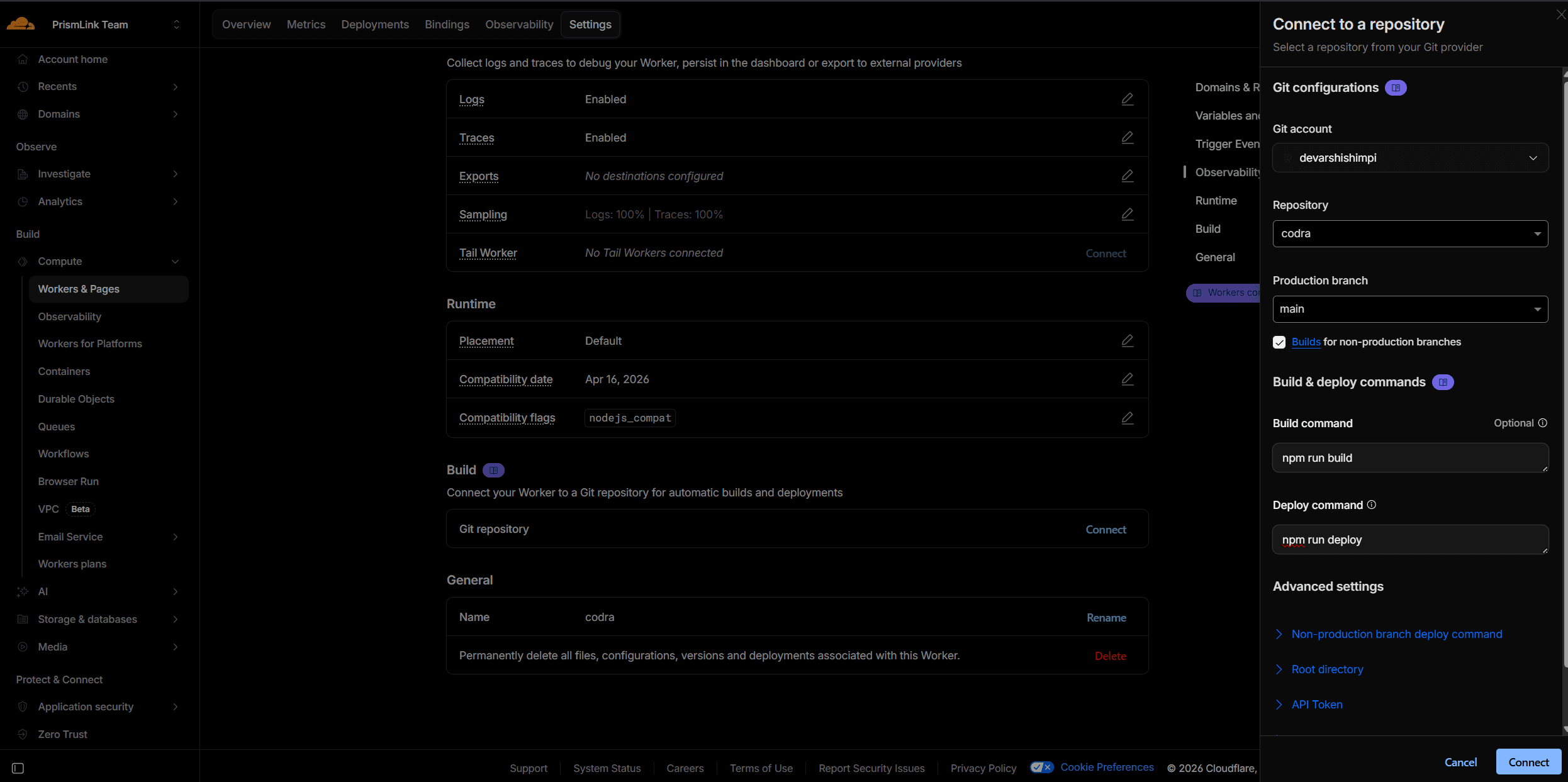
In the Cloudflare dashboard, go to **Workers & Pages**, connect your forked GitHub repository with Workers Builds, and configure the deployment from your fork. Override the deploy command so Cloudflare runs Codra's build, migration, and Wrangler deploy sequence.
| Setting | Value |
| --- | --- |
| Repository | YOUR_ORG_OR_USER/codra |
| Production branch | `main` |
| Root directory | Repository root |
| Build command | `npm run build` |
| Deploy command override | `npm run deploy` |
Connect your fork and override the deploy command so pushes to main deploy through Codra's deploy script.
Advanced / Manual Setup
If you prefer to manually configure your environment variables, Cloudflare resources, and secrets without using the interactive script, follow these steps.
### Environment Variables
Codra reads platform and runtime bootstrap configuration from the Cloudflare Worker environment. For production, these are managed via secrets or the `vars` block in `wrangler.jsonc`.
#### Required Secrets
| Name | Description |
| --- | --- |
| `APP_PRIVATE_KEY` | GitHub App private key in PEM format. In .dev.vars, keep newlines escaped as \n. |
| `GITHUB_APP_ID` | Numeric GitHub App ID. |
| `GITHUB_APP_WEBHOOK_SECRET` | Webhook secret configured on the GitHub App. |
| `GITHUB_CLIENT_ID` | GitHub OAuth App client ID for dashboard login. |
| `GITHUB_CLIENT_SECRET` | GitHub OAuth App client secret. |
| `LLM_CONFIG_ENCRYPTION_KEY` | Required encryption key for dashboard-managed provider API keys stored in PostgreSQL. |
| `DATABASE_URL` | PostgreSQL connection string (supports Hyperdrive). Used by migrations. |
| `CF_API_TOKEN` | Cloudflare API token for Cloudflare model catalog refresh. |
| `CF_ACCOUNT_ID` | Cloudflare account ID for Cloudflare model catalog refresh. |
#### Recommended Production Variables
| Name | Description |
| --- | --- |
| `APP_URL` | Public dashboard URL used in links and review formatting. |
| `AUTH_CALLBACK_URL` | OAuth callback URL, e.g. https://YOUR_WORKER_URL/auth/github/callback. |
| `DASHBOARD_ALLOWED_USERS` | Comma-separated GitHub usernames allowed to access the dashboard. |
| `BOT_USERNAME` | GitHub bot username or mention handle. |
| `GITHUB_APP_SLUG` | GitHub App slug. Used to build the installation-management URL. |
| `ENVIRONMENT` | Runtime label, e.g. production. |
### Manual Cloudflare Setup
Update your `wrangler.jsonc` to bind Codra to your Cloudflare resources manually.
```jsonc
"queues": {
"producers": [{
"binding": "REVIEW_QUEUE",
"queue": "codra-review-jobs"
}],
"consumers": [{
"queue": "codra-review-jobs",
"max_batch_size": 1,
"max_concurrency": 1
}]
}
```
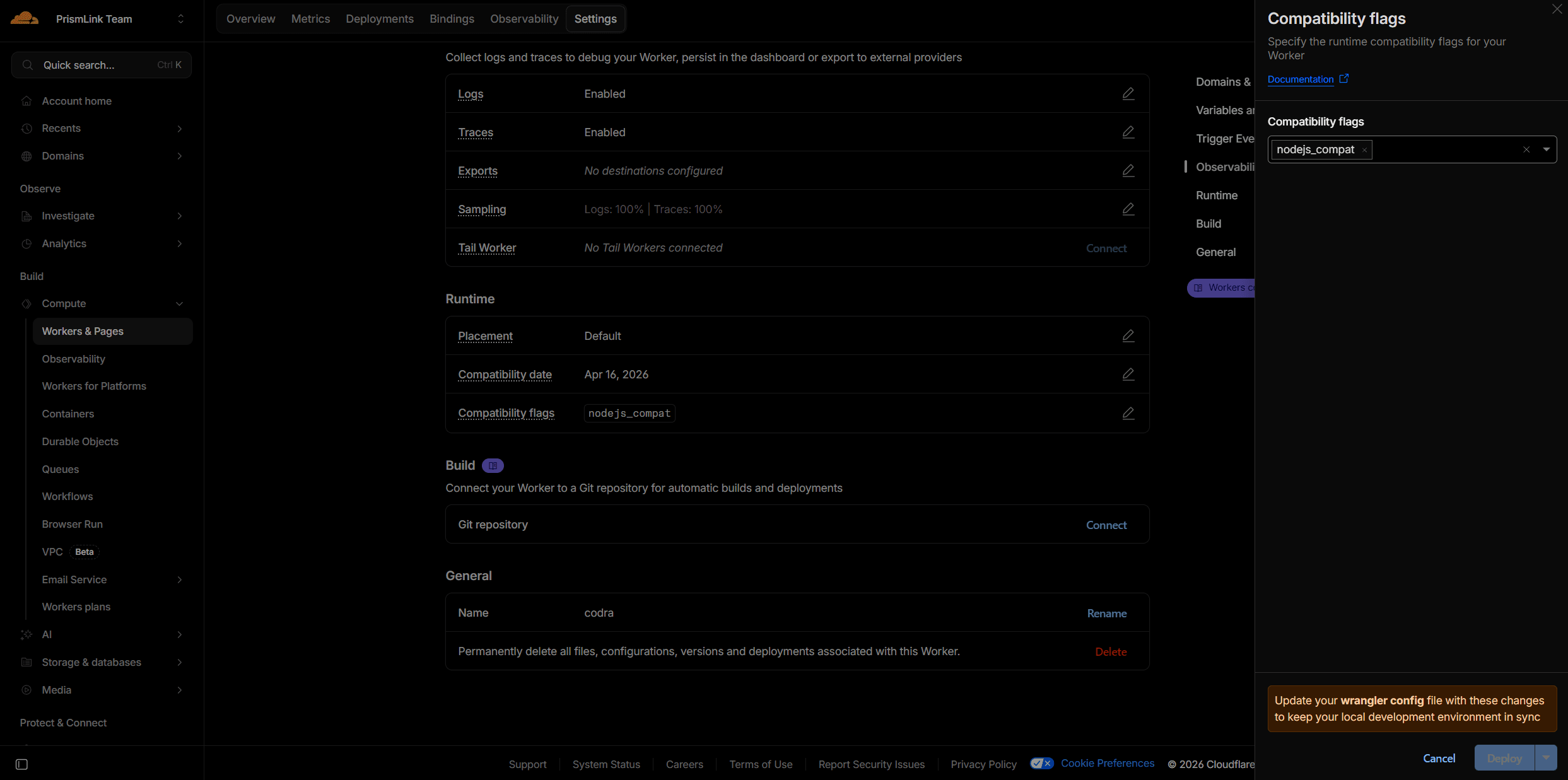
#### Compatibility Flags
Codra requires the `nodejs_compat` flag to be enabled. While this is defined in your `wrangler.jsonc`, you should also verify it in the Cloudflare Dashboard:
Enable the nodejs_compat compatibility flag for the Worker.
### Manual Database Migrations
Set `DATABASE_URL` in your `.dev.vars` or shell, then run:
```shell
npm run migrate
```
### Manual Deployment and Secrets
Set all required secrets via Wrangler:
```shell
npx wrangler secret put APP_PRIVATE_KEY
npx wrangler secret put GITHUB_APP_ID
npx wrangler secret put GITHUB_APP_WEBHOOK_SECRET
npx wrangler secret put GITHUB_CLIENT_ID
npx wrangler secret put GITHUB_CLIENT_SECRET
npx wrangler secret put LLM_CONFIG_ENCRYPTION_KEY
npx wrangler secret put DATABASE_URL
npx wrangler secret put CF_API_TOKEN
npx wrangler secret put CF_ACCOUNT_ID
```
Then manually deploy using:
```shell
wrangler deploy
```
Next: Local Development
Test your Codra deployment locally before going to production.